Togo RV – RV GPS and more
- 2.8
- Rating
- 100.00K
- Installs
- Free
- Price
 Analysis by App-foxy
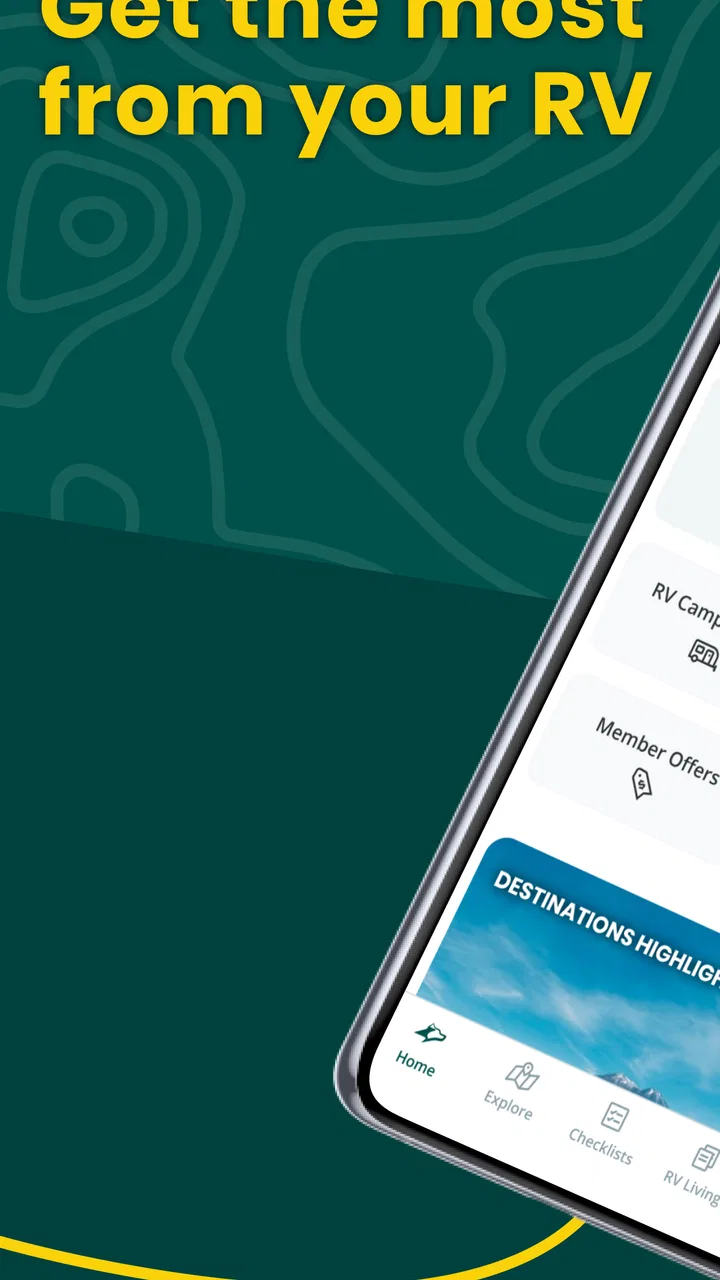
Choosing an RV app is less about finding the one with the longest feature list and more about deciding what kind of help you need on the road. I look for three things first: whether the app can support route planning, whether it helps with the practical routines that surround a trip, and whether I can use it without turning every stop into another research project. Togo RV – RV GPS and more is aimed at that wider problem. It is a free travel and local app from Roadpass Digital that brings navigation, RV guidance, how-to material, and checklists into one place.
That combination makes it more interesting than a standard map application, but it also means the experience is not as simple as opening a dedicated navigation tool and entering a destination. In my experience, Togo RV makes the most sense for people who want an RV companion rather than a GPS alone. It is especially useful when the trip involves preparation, campsite routines, vehicle tasks, and the small decisions that are easy to overlook when you are focused only on the next turn.
What I would consider before choosing Togo RV
The first decision is whether you want one broad RV workspace or several highly focused apps. A normal mapping app is often quicker for a familiar car journey. A dedicated checklist app may be easier for a single repeated routine. A campsite directory may be better when your main goal is comparing places to stay. Togo RV sits between these categories, trying to connect the travel plan with the practical work around it.
You May Also Like

 Blood Strike: 2.5 Anniversary
Blood Strike’s Loadouts Turn Every Drop Into a Tactical Gamble
A close look at Blood Strike’s custom loadouts: how fast access to signature weapons reshapes its battle royale rhythm, rewards preparation, and narrows the gap between fights.

 Pandora - Music & Podcasts
Pandora’s Music Is Easy to Start, but Harder to Recover
Pandora’s strength is its low-effort path from a seed to a station. Its weak spot is how much confidence it asks you to place in connection, setup, and quiet recovery.

 8 Ball Pool
8 Ball Pool Is Built on Rivalries, Rematches, and Routine
A close look at the rivalries, rematches, shared routines, and unanswered safety questions that turn a quick pool match into a persistent mobile community.

 Samsung Music
Samsung Music’s Quiet Strength Is Playing What You Already Own
Its reach comes less from spectacle than from dependable access to a personal library. That simplicity is both the app’s strongest retention engine and its ceiling.

 AccuWeather: Weather Radar
AccuWeather Review: A Quick, Clear Forecast for Everyday Decisions
For everyday plans, the best forecast is the one you can understand quickly. AccuWeather makes rain timing, radar, and local conditions easy to act on, with a few trade-offs.

 Hill Climb Racing
Why Hill Climb Racing Still Turns Crashes Into One More Run
A tiny car, a bumpy hill and one more upgrade: Hill Climb Racing keeps resurfacing because its simple chaos makes every near-miss feel personal.
More From Our News Desk



That matters because RV travel has more stages than ordinary driving. Before leaving, I may need to think about vehicle preparation. During the journey, I need route guidance that fits the nature of the vehicle. At a stop, I may need a reminder for setup or departure. After the trip, I may want to remember what worked and what needs attention next time. An app that covers several of those moments can reduce the number of separate tools I have to remember.
I would also consider how much structure you personally want. Some travelers enjoy building their own system with notes, calendar entries, maps, and saved web pages. Others would rather open one app and follow a more organized flow. Togo RV is aimed at the second group. Its value is not only in any individual screen; it is in having RV-oriented information gathered around the same trip.
The app is free to install, with optional in-app purchases ranging from $0.99 to $59.99 per item. I would treat that as a reason to explore the free experience carefully before committing to anything extra. The basic download lowers the barrier to testing it, while the optional purchases mean the full experience may not be identical for every user.
It is available for everyone from a content-rating perspective, and it runs on Android devices using version 6.0 or later. That makes it accessible on many older phones, which is useful if your RV dashboard device is not your newest handset. The current version is 1.4.55, so I would still keep the app updated before a long trip rather than relying on an old installation.
Why the all-in-one approach can be useful
My strongest reason to try Togo RV would be reducing context switching. When navigation, instructions, and preparation notes live in unrelated places, it is easy to forget the connection between them. A checklist reminder can be more valuable immediately before departure than another map view, while a how-to guide can be more helpful at a campsite than a general search result.
A practical example is a weekend trip where I leave early in the morning. I can use the planning time to review the route, then check the preparation material before pulling away. At the destination, the same RV-focused approach is more relevant than a generic travel app because the questions are different: not only where to go, but how to handle the vehicle and the stop responsibly.
One useful habit is to treat the app as a pre-trip and stop-management tool, not merely as something to open once the engine is running. Reviewing checklists before departure gives them a purpose. Opening a how-to section only when something goes wrong is less effective, especially when mobile reception or patience is limited. I would browse important guidance ahead of time and use the journey itself for confirmation rather than first-time learning.
Navigation is helpful, but it should not replace judgment
The RV GPS angle is the part most likely to attract attention, but I would not make any navigation app my only source of confidence. RV routes involve more than distance and arrival time. Vehicle dimensions, road conditions, restrictions, weather, fuel availability, and the comfort level of the driver all matter. Even when an app is designed for RV travel, I would compare the suggested route with signs, local information, and the vehicle’s actual requirements.
This is one of the important trade-offs with an all-in-one product. A broad app can help connect route planning to RV life, but a specialist mapping tool may feel more focused for people who spend most of their time navigating. If your main concern is precise turn-by-turn guidance and you already have a trusted navigation setup, Togo RV may be more valuable alongside it than as a complete replacement.
I would also prepare for the possibility that a phone screen is not the ideal navigation display in every situation. Before driving, I would set the route, check the destination details, and avoid making complicated changes while moving. The app can support decisions, but it cannot remove the need for a safe driver to verify the road and stay aware of changing conditions.
Where Togo RV earns its place
The clearest strength is its focus on the complete RV routine. Many travel apps stop at destinations and directions. Togo RV tries to cover the less glamorous but very real work that makes a trip go smoothly. The inclusion of RV how-to material and checklists gives it a practical identity instead of making it feel like a general map with an RV label.
I particularly like the idea of using checklists as a memory aid rather than assuming experience prevents mistakes. Even people who have traveled extensively can overlook a small step when leaving a site in a hurry. A checklist is useful because it turns a vague feeling of “I think everything is ready” into a repeatable process. For new RV owners, that structure can make the first trips feel less intimidating.
Another non-obvious benefit is that the app can help separate learning from improvising. If I use the how-to material during a calm moment at home, I can understand the basic process before facing it in an unfamiliar place. That is a better workflow than searching randomly after a problem appears. I would save the most relevant guidance mentally or revisit it before departure, especially for tasks I do not perform often.
The app’s audience is also broader than first-time RV travelers. Experienced owners may not need an explanation for every basic task, but they can still benefit from a central place for checklists and trip preparation. The value changes with experience: beginners may use it for confidence, while experienced users may use it for consistency and to reduce the chance of skipping a routine step.
Its public reception is mixed, with an average rating of 2.8 from around 464 ratings and 237 reviews. I would not ignore that signal, but I would read it in context. An app that combines several functions can disappoint users for different reasons: one person may want stronger navigation, another may dislike the interface, and another may be judging optional features. The rating tells me to test the parts I personally need instead of assuming the whole product will suit me.
A realistic way I would use it on a trip
Imagine I am preparing for a short RV getaway with a late afternoon arrival. The night before, I would open Togo RV to think through the route and review the preparation checklist. I would pay attention to the tasks that are easy to rush, such as making sure the vehicle is ready to leave and that the departure routine is complete. I would also read any relevant how-to guidance while I still have time to concentrate.
On the travel day, I would use the GPS portion as one part of the plan rather than blindly following it. If the route changes because of weather, roadwork, or a local restriction, I would stop safely and reassess. Once parked, I would use the RV-oriented material as a reference for the setup process. Before leaving the next morning, I would return to the checklist instead of relying on memory.
This workflow shows where the app is more useful than a normal maps tool. A map may get me to the destination, but it does not naturally cover the preparation and departure habits that surround RV travel. Togo RV’s advantage is the connection between those stages.
Small workflow improvements that make it more useful
My first tip is to review the app when you are not under pressure. A checklist becomes much less helpful if you are discovering its purpose while other people are waiting to leave. Spend a few minutes before the trip identifying which sections match your own vehicle and habits. That turns the app from a general reference into a personal routine.
My second tip is to use it as a shared planning aid. If two people travel together, one person can focus on navigation while the other checks preparation tasks, but both should understand the process. This avoids making one traveler the only person who knows where the important information is. It also makes the app useful for teaching a new co-traveler without turning every instruction into a last-minute conversation.
My third tip is to compare the app’s convenience with your phone setup before buying optional items. If the free version already supports the parts of the workflow you care about, there may be no reason to add anything. If you need more depth, consider whether the purchase solves a real problem for your trips rather than simply adding another feature to explore.
When another type of app may fit better
Togo RV is not automatically the best option for every traveler. If you only need ordinary driving directions for occasional car trips, a familiar general-purpose maps app will probably be faster and simpler. There is little benefit in adopting a broad RV tool for journeys where none of its RV-specific guidance or checklists will be used.
It may also be the wrong choice for someone who wants a very specialized navigation experience and already has a system they trust. In that case, adding a second navigation-oriented app can create uncertainty rather than remove it. I would use Togo RV for its RV planning and practical material while keeping the established navigation tool in charge if that is the arrangement I already understand.
On the other hand, a collection of separate apps can become tiring. One app for maps, one for notes, one for checklists, and one for how-to searches may offer more depth in individual areas, but the information becomes fragmented. Togo RV wins when convenience and shared context matter more than having the absolute best tool for each isolated task.
The mixed rating also makes the comparison personal. Someone who values a polished, narrow-purpose interface may prefer a specialist alternative. Someone who wants a single RV-centered starting point may be more forgiving of occasional friction. I would judge it by the tasks that matter most to me, not by the promise of using every available part.
Questions I would settle before relying on it
Can it replace every other travel tool? I would say no. I see it as a central RV companion, not a guarantee that you will never need another map, local source, or personal note. Its strongest role is bringing navigation-related planning together with RV guidance and checklists.
Is it suitable for a beginner? Yes, particularly if the beginner wants a structured way to prepare and learn. I would still recommend practicing important routines at home and checking the vehicle’s own documentation. An app can organize knowledge, but hands-on familiarity is more valuable when something unexpected happens.
Will it suit an experienced owner? It can, especially for repeatable checklists and keeping trip preparation organized. The benefit may be smaller if you already have a reliable system that you use consistently. In that situation, switching only makes sense if Togo RV reduces effort rather than adding another place to maintain.
Should I pay for optional content immediately? I would not. I would install the free app, test the navigation and RV-oriented sections on a low-stakes outing, and decide whether the additional purchase addresses a specific need. The available in-app items span from $0.99 to $59.99, so the decision deserves more thought than a casual tap.
Is it accessible on an older Android phone? The minimum requirement is Android 6.0, which is helpful for users who keep an older device in the vehicle. Still, I would test the app before a major journey, because practical reliability depends on the phone, connectivity, battery condition, and how comfortable the screen is to use in the dashboard position.
My recommendation after weighing the trade-offs
I would recommend Togo RV to RV owners who want one place to support the whole travel routine, especially people who appreciate checklists and practical guidance as much as directions. Its best quality is not that it tries to do several things; it is that those things belong to the same kind of trip. Navigation, preparation, and RV know-how make sense together.
I would be more cautious if navigation precision is your only priority, if you already have a dependable specialist setup, or if you dislike apps that combine several purposes. In those cases, a focused alternative may feel cleaner. I would also take the average rating of 2.8 seriously enough to test the experience personally before making it central to a long journey.
Roadpass Digital has positioned this as a practical travel and local app rather than a simple destination finder. With over 100K installs, it has found an audience, but popularity alone does not decide whether it belongs on your phone. For me, the deciding factor would be whether the checklists and how-to material improve my actual routine, not whether I can say I have another GPS installed.
My bottom line is simple: try Togo RV if you want an RV-focused planning companion that can help before, during, and after a trip. Use it alongside sensible route checks, vehicle knowledge, and safe driving habits. If you only need quick directions, choose a simpler map. If you want to make RV preparation less scattered, this free starting point is worth exploring before deciding whether any optional purchase is justified.
FAQs for Togo RV – RV GPS and more
01What is Togo RV – RV GPS and what does it offer?
Togo RV is an RV-focused travel and navigation app designed to help motorhome and trailer owners plan trips, find campgrounds, discover RV-friendly services, and organize important travel information. Besides route planning, it may provide campground details, reviews, trip ideas, maintenance resources, and other tools intended specifically for recreational vehicle travel rather than ordinary car navigation.
02Can Togo RV create routes that account for my RV’s size and restrictions?
One of the main reasons RV travelers consider Togo RV is its focus on vehicle-aware routing. Depending on the selected plan, region, and available mapping data, you can enter details such as height, length, weight, or other vehicle information to help avoid unsuitable roads. However, no navigation app is perfect, so always verify signs, bridge clearances, road conditions, and local restrictions before following a route.
03Does Togo RV include campground information and reviews?
Yes, campground discovery is a central part of the app. Users can browse potential places to stay, review available information, compare options, and use ratings or comments from other travelers when planning an overnight stop. The amount of information can vary by location, and listings may change, so it is wise to confirm prices, availability, amenities, pet rules, and reservation requirements directly with the campground.
04Is Togo RV free to download, or does it require a subscription?
Togo RV can generally be downloaded without an upfront charge, but some of its more advanced tools may require a subscription or paid membership. Premium access can include enhanced navigation features, trip-planning tools, campground resources, discounts, or additional RV services. Before starting a trial, check the current pricing, renewal terms, included features, and cancellation instructions shown in the App Store or Google Play.
05Does Togo RV work without an internet connection?
The app may require an internet connection for certain functions, including loading updated maps, campground listings, reviews, account information, traffic details, and other online content. Travelers should not assume that every feature works offline. Before entering remote areas, prepare your itinerary, save important campground details, download any available map data, and keep a backup such as printed directions or another navigation app.
Pros
- Designed specifically for RV dimensions
- helping avoid unsuitable roads and bridges.
- Includes offline map support for travel in areas with weak mobile coverage.
- Provides useful information on campgrounds
- fuel stops
- and RV-friendly services.
- Route planning can account for vehicle height
- weight
- and length restrictions.
- Helpful trip-planning tools make it easier to organize multi-stop journeys.
Cons
- Accurate RV routing depends on entering your vehicle measurements correctly.
- Some maps
- features
- or destinations may require a paid subscription.
- Offline maps can use considerable storage space on your device.
- Coverage and campsite details may vary significantly by country or region.
- GPS navigation can drain the battery quickly during long driving days.

Togo RV – RV GPS and more
Gallery